
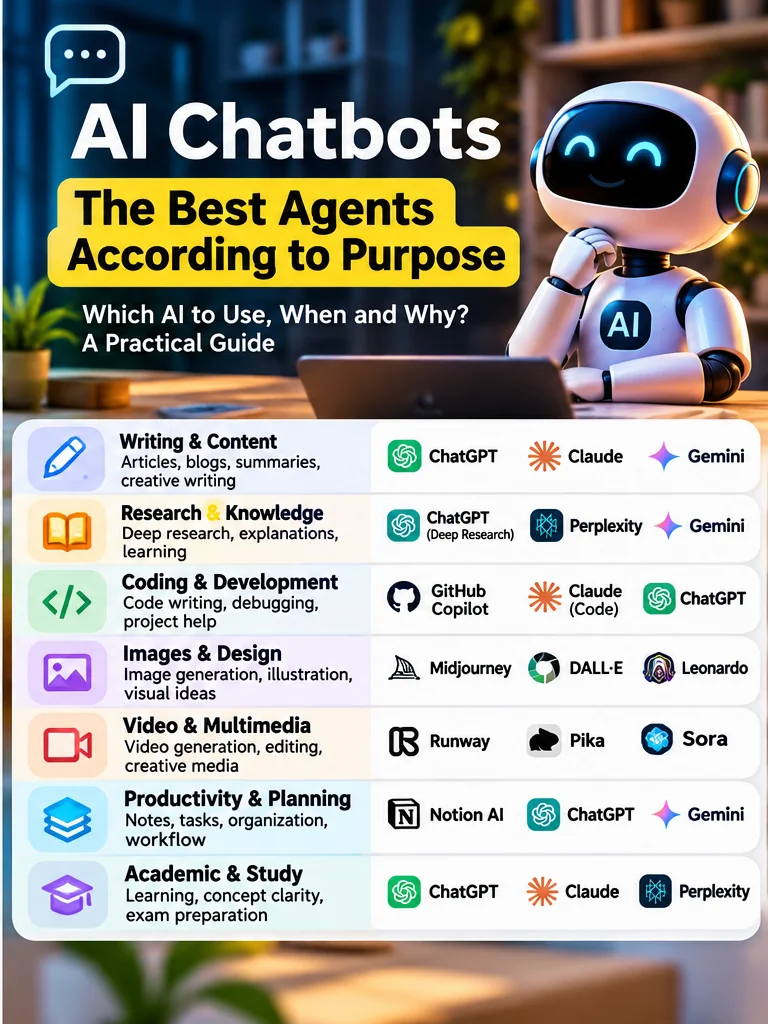
AI Chatbots and Agents in 2026: Which Tool Is Best for Each Purpose?
One person wants a chatbot to explain a difficult chapter. Another wants an AI to review a hundred research papers. A developer wants software bugs fixed; a small business wants emails, spreadsheets and presentations prepared. They are not the same problem—and the best choice is rarely the same tool.
As of November 2026, AI assistants include conversational models, source-grounded research tools, coding agents and software-connected workflow agents. This guide matches tools to jobs, explains trade-offs and shows when human review remains essential. It is an editorial comparison based on documented capabilities, not a controlled head-to-head benchmark. Product names, plans and features change rapidly.
Chatbot versus agent: what is the difference?
A chatbot mainly responds to prompts: asking questions, drafting language, explaining ideas or analysing provided material. An agent has access to tools and can carry out multiple steps toward a goal—for example, searching sources, editing repository files or operating connected business applications. The distinction is not absolute: the same product may offer both ordinary chat and agentic modes.
Neither autonomy nor confident wording guarantees correctness. An agent may misunderstand instructions, use inaccurate sources, or make consequential changes. Review permissions and outputs before trusting them.
Quick comparison: choose by task
| Primary purpose | Strong options to evaluate | Why they fit |
|---|---|---|
| General writing and everyday help | ChatGPT, Claude, Gemini | Flexible discussion, drafting, explanation and revision. |
| Web questions with visible sources | Perplexity, ChatGPT research, Gemini Deep Research | Discovery, source links and research-oriented workflows. |
| Long reports and complex research | ChatGPT Deep Research, Gemini Deep Research, Claude research workflows | Multi-step synthesis, organisation and evidence review. |
| Working from uploaded study materials | NotebookLM, ChatGPT, Claude | Source-grounded notes, questions, summaries and discussion. |
| Software development and debugging | GitHub Copilot, Claude Code, OpenAI Codex | Repository context, code editing, tests and development tooling. |
| Word, Excel, PowerPoint and Outlook workflows | Microsoft 365 Copilot | Integrates with Microsoft productivity software and permitted workspace data. |
| Google Docs, Gmail and Sheets workflows | Gemini and Google Workspace AI features | Integrates with Google's productivity ecosystem, subject to access. |
| Research and production of visual assets | ChatGPT image tools, Gemini image tools, specialist creative apps | Rapid iteration on illustrations, mockups and creative concepts. |
This table is a starting shortlist, not an objective universal ranking. The best product depends on your source material, data privacy needs, language, availability, cost and preferred software.
1. General conversation, writing and learning
ChatGPT: A broad option for explaining concepts, outlining articles, brainstorming, coding help, file analysis and some multi-step work, depending on the available plan and tools. It suits users who want varied tasks in one workspace.
Claude: Worth testing for drafting, editing, reasoning through long documents and coding-oriented workflows. Its writing style may suit some users more than others; preference is subjective and should be tested with the same prompt.
Gemini: An especially relevant option for people who already work heavily inside Google's ecosystem and want information or help that connects with Google-supported services.
How to choose: Give all three the same real task, the same source files and a clear evaluation checklist. Compare factual accuracy, effort spent correcting errors and whether the output fits your workflow—not just whether the answer sounds polished.
2. Current events and evidence-based research
Perplexity: Useful for web-first questions and quickly tracing claims back to linked sources. Source citations make checking easier, but do not eliminate hallucinations or source-quality problems.
ChatGPT Deep Research: Appropriate for sustained investigation, multi-source synthesis and structured reporting where the system can work through research steps and create a report.
Gemini Deep Research: Another option for multi-step research and report preparation, including capabilities that Google continues to expand.
Research warning: A confident summary with five citations is not automatically true. Open the underlying sources, check publication dates, distinguish primary studies from commentary, and look for omitted contrary findings.
3. Academic research, medical learning and long documents
NotebookLM: Particularly attractive when you have a defined set of papers, lecture notes, textbooks or reports. Its source-focused approach helps you ask questions about *the documents you supplied*.
ChatGPT or Claude: Useful for helping construct literature tables, critique methods, suggest search terms, prepare study guides and explain statistical ideas. They must not invent references or replace critical appraisal.
For medicine, never upload identifiable patient records into a consumer tool without an appropriate legal basis, institutional approval and suitable data protections. AI-generated diagnostic or treatment suggestions require professional verification against authoritative, current guidance.
A strong workflow is to retrieve papers from established scientific databases, organise your source set, then ask the assistant to identify research questions, methodology differences, bias and unanswered questions. Verify each extracted claim against the actual paper.
4. Programming, websites and software agents
GitHub Copilot: Strong fit for developers living in GitHub, VS Code and related code-review workflows. Copilot's agentic features can edit code and help with assigned issues under human supervision.
Claude Code: A terminal- and repository-oriented agent for reading, modifying, testing and reasoning across a software project.
OpenAI Codex: An agentic coding option for navigating a codebase, making changes, running checks and working with development tasks.
Recommendation for beginners: Start with one small repository and a clearly defined bug. Ask the agent to explain each change, run tests, show the diff and avoid changing authentication or production databases without approval. Keep backups and version control.
5. Office documents, spreadsheets, meetings and workflows
Microsoft 365 Copilot: Natural option for teams already in Word, Excel, PowerPoint, Outlook and Teams. Integration with organisational files and permissions may be more valuable than the model's conversational style alone.
Gemini for Google Workspace: A natural candidate for teams committed to Docs, Sheets, Drive and Gmail. Check what is actually included in your workspace subscription.
General agents: Tools that connect to calendars, email, browsers or file systems can simplify repetitive work, but should be granted the minimum necessary permissions. Require confirmation before purchases, account changes or sending sensitive messages.
6. Images, video and creative production
General-purpose assistants increasingly include image generation and editing; specialist creative software may offer better control over typography, brand consistency, animation, timelines or asset exports. Test the desired *deliverable*: a readable poster, editable layered file, production-ready video, or social thumbnail. A beautiful preview is not necessarily an editable or legally usable asset.
If publishing AI-generated illustrations of real news events or historical people, label them as illustrations and never misrepresent them as documentary photographs. Review licensing and commercial-use terms for the particular tool and account.
7. Language, accessibility and study assistance
For language learning, compare the model's handling of your target language rather than relying on marketing claims. Ask it for translations, multiple registers, grammar corrections, pronunciation notes and counterexamples. For multilingual educational content, human review is essential—especially for less-resourced languages and technical vocabulary.
A good study prompt is: “Use only the attached notes. Give me five increasingly difficult questions; explain each answer with the page or section where the evidence appears. Say clearly when the document does not answer a question.”
8. How to test an AI assistant fairly
| Test | What to measure |
|---|---|
| Accuracy | Does it correctly answer questions with checkable answers? |
| Evidence | Can you trace factual claims to real, relevant sources? |
| Workflow fit | Can it use the files and apps you actually work with? |
| Editability | Can you revise and export the final output in a useful format? |
| Privacy | What is retained, connected or available to administrators? |
| Cost | Does the total plan cost justify the time it saves? |
| Reliability | Can it repeat the task with acceptable consistency? |
| Human control | Can you review changes before emails, code or transactions are submitted? |
A simple experiment: choose three identical tasks, set a 20-minute time budget for each tool, and score accuracy, revision effort, source quality, speed and total cost. The “winner” can be different for each category.
9. Five mistakes to avoid
- Assuming the model with the most impressive demo is best for your daily work.
- Treating cited but unread sources as verified evidence.
- Giving an autonomous agent unrestricted access to private accounts.
- Using AI output as unreviewed medical, legal or investment advice.
- Confusing a company's model name with its consumer app, subscription or available tools.
The practical conclusion
Choose tools by the task, not by loyalty to a brand. For everyday writing, compare ChatGPT, Claude and Gemini. For web-first research, test Perplexity and specialised deep-research modes. For evidence-bound document study, evaluate NotebookLM. For programming, test GitHub Copilot, Claude Code and Codex. For office automation, start with the assistant integrated into the software you already use.
The most effective workflow may combine two tools: one to discover sources or draft, and another to verify, edit or implement. A human remains responsible for the final claim and action.
Product sources checked (November 2026)
- OpenAI — Deep Research: https://help.openai.com/en/articles/10500283-research-faq
- OpenAI — ChatGPT Work: https://openai.com/index/chatgpt-for-your-most-ambitious-work/
- Anthropic — Claude Code practices: https://www.anthropic.com/research/claude-code-best-practices
- GitHub — Copilot features and agents: https://github.com/features/copilot
- Google — Deep Research: https://blog.google/innovation-and-ai/models-and-research/gemini-models/next-generation-gemini-deep-research/
- Google — NotebookLM research: https://blog.google/innovation-and-ai/products/notebooklm/better-research-notebooklm/
- Perplexity — Pro Search: https://www.perplexity.ai/help-center/en/articles/10352903-what-is-pro-search
- Microsoft — Copilot in Microsoft 365: https://www.microsoft.com/en-in/microsoft-365-copilot/in-apps-for-work
Editorial disclosure: This is an independent, purpose-based comparison, not a sponsored ranking. Features and plan availability can change; check current official documentation before purchasing.